
The Furbo 360° Dog Camera is a highly capable monitoring solution that helps pet owners stay connected through interactive treat tossing, two-way audio, and smart AI safety alerts. While it requires a paid Furbo Nanny subscription to activate and lacks 5GHz Wi-Fi support, it is an ideal choice for busy owners who want comprehensive, real-time insights into their dog's daily activity and well-being.
Disclosure: As an Amazon Associate, I earn from qualifying purchases. This means when you purchase through links on this page, I may earn a small commission at no extra cost to you.
Furbo 360 Dog Camera Review 2026
If you are looking for a reliable way to monitor your pet while away from home, this Furbo 360 Dog Camera review for 2026 covers everything you need to know before buying. The Furbo 360° Dog Camera is designed for dog owners who want interactive features like a treat tossing camera, two-way audio, and a full room view. However, this model requires a paid Furbo Nanny subscription to activate out of the box. Based on the product specifications, we will look at who this smart pet monitor is best suited for, its core capabilities, and whether its mandatory subscription model makes sense for your household.
Table of Contents
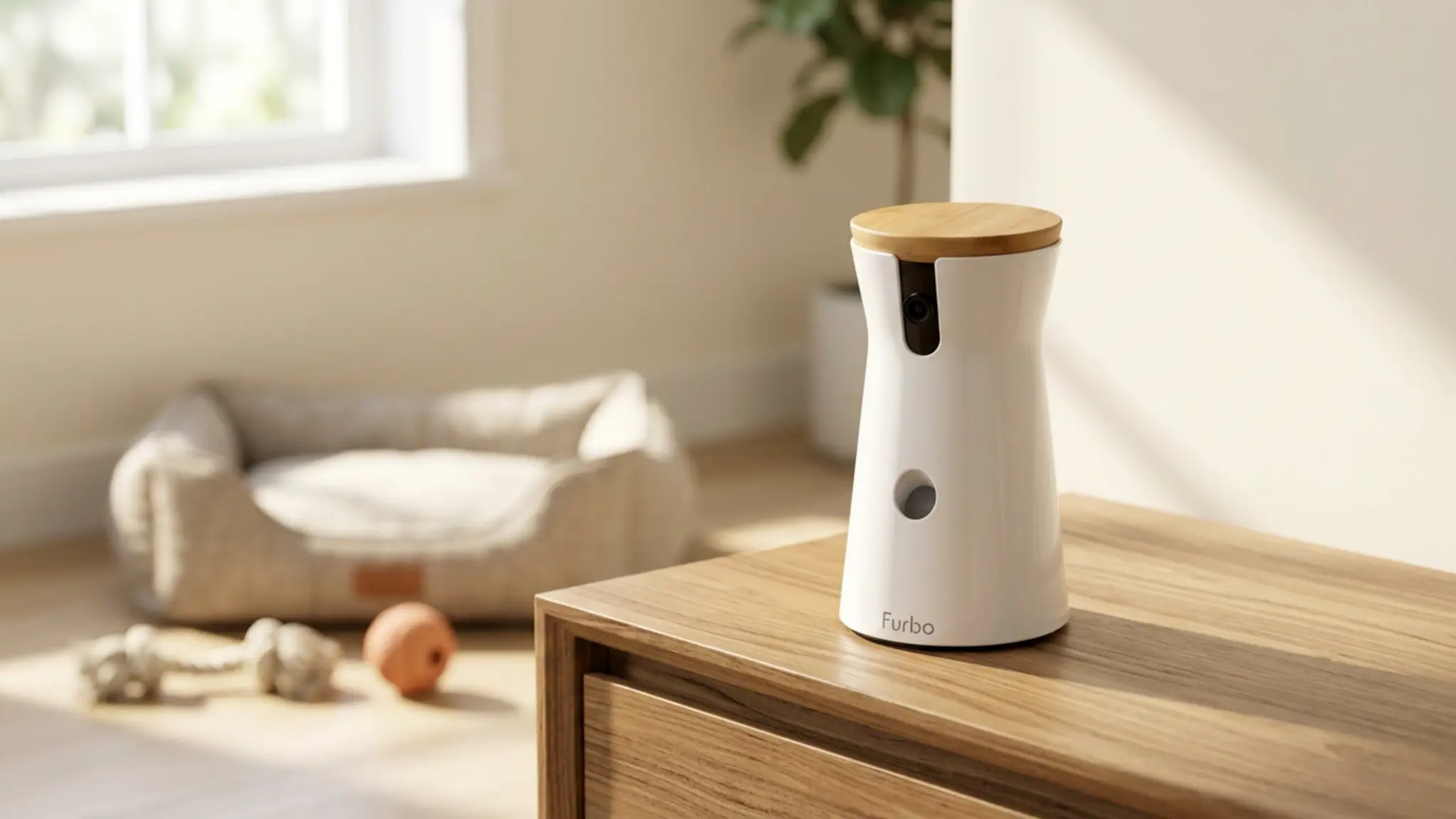
What You Get With the Furbo 360 Dog Camera
- Mandatory Activation Subscription: Requires a paid Furbo Nanny plan (monthly or yearly) to unlock the device during initial setup.
- Interactive Treat Dispenser: Allows owners to toss treats remotely via the iOS or Android app to reward pets or provide a distraction.
- 360-Degree Rotation & Tracking: Provides whole-home coverage and auto-tracking to keep your dog in frame as they move around the room.
- Smart Notifications: The video history subscription includes real-time smart alerts for barking, unusual activity, or emergencies.
Real-World Use and Practical Notes
In typical daily use, this model functions as a highly interactive way to check on your pets. The 360-degree rotation allows owners to scan the room, which is particularly useful for dogs that tend to wander out of a fixed camera’s frame. The treat toss feature operates via the mobile app, providing a simple way to distract or reward your dog remotely.
It is important to note a few realistic limitations based on the listed features. Setup requires a 2.4GHz WiFi connection, as 5GHz networks are not supported. Additionally, while a USB cable is included, the required USB power adapter is not, meaning buyers will need to provide their own wall plug. Manufacturer information on the Furbo support page can help confirm current network and power specifications.
The most significant practical factor is the mandatory activation requirement. A paid plan must be selected during setup, involving either a yearly commitment or a monthly plan with a one-time activation fee. If you cancel after the minimum three-month period, essential features like live view, two-way audio, and treat tossing remain active.
Alternatives Worth Considering
For buyers comparing similar products, the mandatory subscription model on this device might not fit every budget. If you simply want to keep an eye on your pet without ongoing fees or treat-tossing capabilities, standard home security cameras are often more cost-effective.
For example, our Tapo C101 indoor camera review covers a budget-friendly alternative for basic monitoring. Similarly, our Kasa indoor security camera review highlights another highly-rated option for pet owners who just need standard video feeds. These alternatives lack AI dog alerts and treat dispensers, but they offer straightforward viewing without high subscription costs.
The Right (and Wrong) Buyer for This Product
This interactive camera is best suited for a few specific types of pet owners. First, it is a strong option for people who work long hours and want to actively engage with their dogs using audio and treats. Second, it appeals to tech-focused users who want home safety alerts and video history to track their dog’s daily activity.
Third, it can be useful for owners managing pets with mild stress, as checking in and tossing a treat can offer a helpful distraction. If separation anxiety is a major concern, our HuggiePup Heartbeat Toy review looks at a complementary comfort item. For broader background on managing pet stress, the American Kennel Club offers general guidance on behavioral training.
You should skip this model if you strictly oppose subscription fees or only have a 5GHz WiFi network. Buyers who just want a basic, free-to-use live feed will find the mandatory activation plan frustrating.

Questions Buyers Keep Asking
Do I have to pay a subscription to use the Furbo 360 Dog Camera?
Yes, a paid Furbo Nanny plan is required to activate the device during setup. However, if you cancel after the minimum period, you keep core features like live view and treat tossing.
Does this camera support 5GHz WiFi?
No, based on the manufacturer specifications, this smart pet monitor only connects to 2.4GHz WiFi networks.
Does it come with a wall plug?
The package includes the device and a USB cable, but it does not include the USB power adapter needed to plug it into a standard wall outlet.
What are the advanced smart notifications?
With an active subscription, the barking sensor and AI tools send real-time notifications to your phone if your dog is crying, howling, or if there is an emergency at home.
For 2026 buyers, deciding on this device comes down to how much you value interactive features and cloud recording. If you want a premium way to check in, speak to, and reward your pet while you are away, the Furbo 360 Dog Camera offers an excellent, feature-rich experience. However, the mandatory activation fee and subscription requirement mean it is best suited for owners who are comfortable paying ongoing costs for advanced monitoring capabilities.